

What is the NIS2 regulation?
The European Union’s NIS2 Directive aims to strengthen cybersecurity and improve the accuracy of data related to online services, such as domain name registrations. It specifically requires the verification of contact details of registrants (domain owners).
Who is affacted by the regulation?
The NIS2 regulation applies to all domain owners, whether individuals, companies, or resellers.
It is important to note that the regulation does not apply only to EU domain names — it applies to all domain names.
The practical implementation of the NIS2 Directive took place during 2024–2025 across various domain registries. As part of this process, mandatory contact data verification was extended to multiple domain extensions. Domain registrars are required to follow these rules and ensure that customers are notified and that the validation process is completed on time.
The connection between NIS2 and domain WHOIS records
The goal of NIS2 is to maintain a more accurate and verified database. However, this does not mean that all data will become public.For individuals, most TLDs will continue to hide email addresses and phone numbers in the public WHOIS database.
For companies, some data (such as the company name) may be visible, but this depends on the specific domain extension.
Verification of contact details
Situation in Hungary
We have previously summarized the changes related to .hu domain names.
The .hu registry has recently introduced a new rule: once a year, the .hu registry sends a reminder email regarding data verification. There is no action required for this email — it is only a reminder that if any of your contact details have changed, you should immediately contact your domain registrar to update them.
Other domain extensions
Registration rules have also become stricter for other domain extensions.
We would like to inform all customers that if you own a domain name that is not .hu, .eu, .com, .net, or .org, you are required to validate the email address and all phone numbers provided during registration once a year.
This may affect domains such as .info, .biz, .online, .shop, .site, .xyz, and hundreds of other extensions.
Who sends the validation email?
It is important to note that the validation email is not sent by DotRoll, but by an official designated service:
**Sender: DomainValidation.com
Email address: support@domainvalidation.com
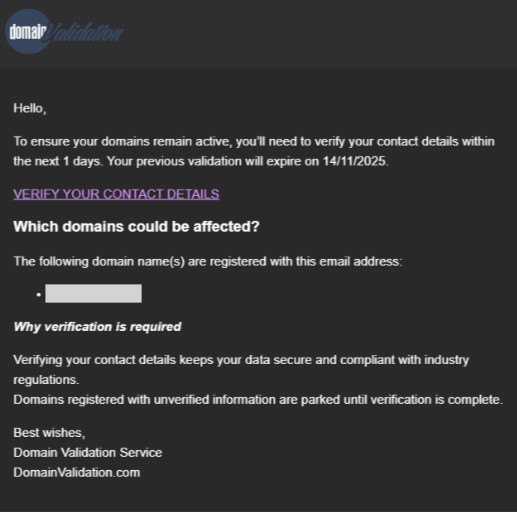
Many people believed the email was spam because it comes from an unfamiliar sender — however, it is not spam. The link in the email is used for the mandatory annual validation.
What does the validation email look like?
The email is in English. It includes the domain name (shown in a grey box) and contains a confirmation link labeled: VERIFY YOUR CONTACT DETAILS
The verification link redirects you to the DomainValidation.com website. For phone number validation, you can choose between SMS verification or voice call confirmation.
What happens, if you do not validate your email address or phone number in time?
If the owner does not complete the validation:
⇒ the domain will be parked,
⇒ the associated website will become unavailable,
⇒ services connected to the domain (such as email) will be suspended,
⇒ the suspension will remain in effect until the validation is completed.
Why is this necessary?
The purpose of the stricter rules is: To filter out false or outdated data, To verify real domain ownership, To improve data security, To reduce abuse and fraud.
Verified contact details help ensure that only the real owner has access to the domain.
What should you pay attention to?
⇒ Please do not ignore the validation notification, as it may affect your domain’s operation.
⇒ If you own multiple domains, make sure to check all of them.
⇒ Always ensure that an active and accessible email address and phone number are assigned to your domain.
⇒ If you operate as a company, it is recommended to use a central, non-personal email address (for example: domain@cegnev.hu).
⇒ If your phone number or email address changes, update it in all your accounts as soon as possible.