# How to Reset Pages, Blogs or Site

This guide will show you how to Reset Pages, Reset Blogs and Reset Site.

#### <span class="mw-headline" id="bkmrk-reset-1">RESET</span>

When you are on SitePad Editor you will see Reset Button. Click on the Reset Button.  
   
![](https://dotroll.com/wp-content/uploads/2020/08/Reset1.png)  
   
Then you will find three option. Choose an appropriate option.  
   
![](https://dotroll.com/wp-content/uploads/2020/08/Reset2.png)

<p class="callout info">**Note:**  
1. Reset all Pages – This will Reset only Pages.  
2. Reset all Blog Posts – This will Reset only Blog Pages.  
3. Reset full site – This will Reset full site (after reset you will need to start making the website from scratch).</p>

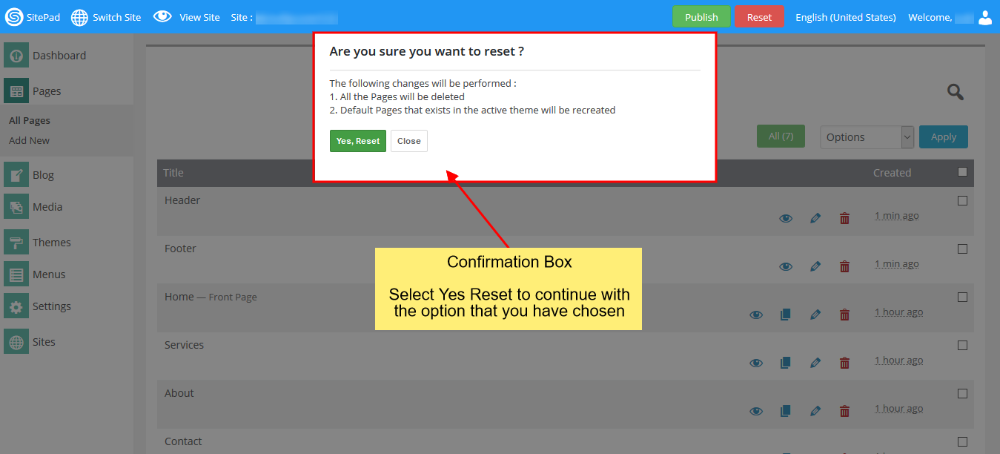
Once you select the option then click on **Continue** Button. Then you will see a confirmation box.  
   
![](https://dotroll.com/wp-content/uploads/2020/08/Reset3.png)  
   
When you click on **Yes, Reset** Button it will process ahead with the option that you have just confirmed.

Once Reset is done it will reload the page.

<p class="callout info"><span class=".">**Note:** On Full Reset you will be redirected to Themes where you will need to select the new theme.</span></p>