**.hu owner change** will only be possible if the domain name is already **using factor-based authentication.** If the domain name is still document-based and you want to change the owner the domain must first be converted to factor authentication. **Only the current Registrar can perform this modification; the new registrar cannot.**
#### **REPLACE THE CURRENT OWNER OF THE DOMAIN NAME**
1. 1. Sign in with [https://admin.dotroll.com](https://admin.dotroll.com/?swcfpc=1) with your username and password
2. In the top menu bar, click the **Domains** / **My Domains** menu.
3. Select the domain name on which you want to make the change and then click on it.
4. In the **Manage** box on the left, select **Contacts change**.
5. At the top of the page that appears, you can see the current domain owner and its data.
6. To modify, you can select from the drop-down list under **Owner**:
- formerly created the contact
- or select the **Add New Contact…** option to add a new contact
7. Choose the owner type that can be:
- Person
- Company
8. Then fill out the form elements.
9. Click the **Next** button where the system will show an overview page with the data you entered.
10. If all data is correct, click **Checkout** button of the bottom of the page.
11. We submit the order to the central registry, and the .hu registry will send the necessary emails for validation and confirmation. Please follow the instructions in the emails, and once all confirmations are completed, the .hu registry analyst will approve the ownership change. **Please check your email inbox regularly!**
12. You can return to the online interface at the bottom of the page by clicking the **« Back to the Client Area** link.
13. Then, in the top menu bar, click **Services** / **My Services**.
14. On the page that appears, click the row marked **Contacts change**.
Enter the domain name in the search box without any prefixes (http://, https://, www.), and then click the **Search** button. The system also verifies that other domain name endings have this option for registering a domain name.
1. If the domain name you choose is not yet registered, click **Add to Cart,** followed by the **Checkout** button.
2. On the next page you have the option to choose a hosting service for the domain name you want to register, or you can set the name of the domain name to be registered. After you have made the settings, click **Continue →** button.
3. he system will display a summary of the order where it is possible
- you can modify the domain name registration period
- you can cancel the order
- you can also start an additional order
- if you have a promotional code, you can specify it
If all settings are correct, click the **Checkout →** button.
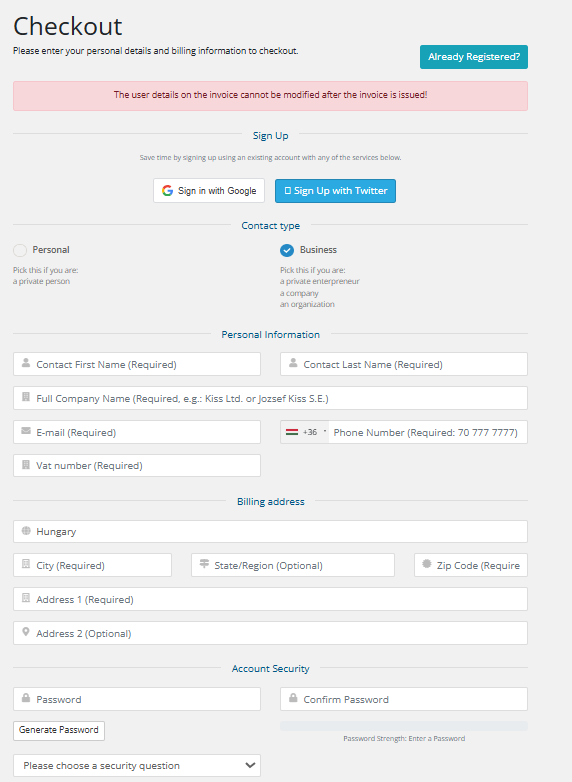
4. You can then enter contact details for the domain name (owner, administrative or technical contact). For each order, you can use previously-entered contacts, but you also have the option to enter a new contact for each domain name.
[](https://dotroll.com/en/knowledge-base/uploads/images/gallery/2025-03/image.png)
[](https://dotroll.com/en/knowledge-base/uploads/images/gallery/2025-03/az3image.png)
5.
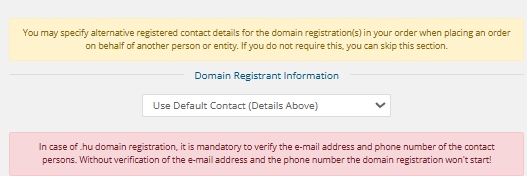
It is essential that (if your email address and phone number have not been verified in the past year) for a .hu domain registration, it is mandatory to confirm your email address and phone number. Please provide a valid and actively used contact! **Without verification, the domain registration will not proceed!**
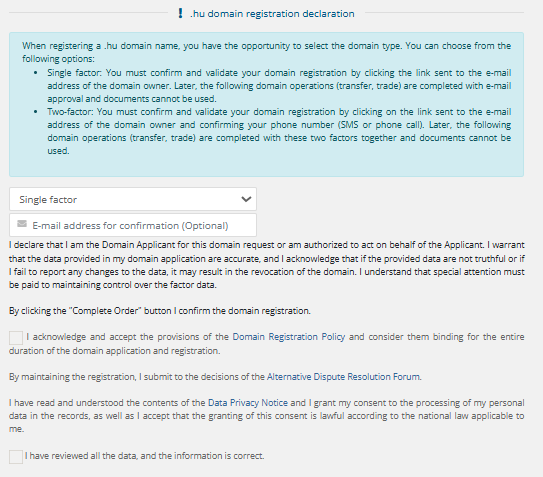
6. Select whether you want a single-factor or two-factor domain registration, then read and accept the checkboxes! If you do not fill in the **"e-mail address for confirmation"** field, it will default to the applicant's email address.
[](https://dotroll.com/en/knowledge-base/uploads/images/gallery/2025-03/7Ntimage.png)
Future modifications must be confirmed using a factor rather than document-based verification. The first factor is always the email address, and in the case of two-factor authentication, the second factor is always the phone number.
7. At the bottom of the page, you must choose a payment method that may be one of the following:
- CreditCard via PayPal
- BankTransfer
- Credit card payment
- PayPal
Next, check the box to **I have read and agree to the Terms of Service** and then click the **Complete Order →** button.
8. On the next page, enter the captcha code for the .hu domain name entry, and then click **I agree** button.
9. After that, the system will automatically be redirected to the payment interface.
10. After the payment completed, your order will be forwarded, and started to the Council of Hungarian Internet Providers (CHIP). ***If verification is required, please check your inbox, as the confirmation email will be sent immediately after placing the order!***
11. Once the domain name has been successfully registered, our system will send you an email notification to the email address provided at the account payer.
Enter the domain name in the search box without any prefixes (http://, https://, www.), and then click the **Search** button. The system also verifies that other domain name endings have this option for registering a domain name.
1. If the domain name you choose is not yet registered, click **Add to Cart,** followed by the **Checkout** button.
2. On the next page you have the option to choose a hosting service for the domain name you want to register, or you can set the name of the domain name to be registered. After you have made the settings, click **Continue →** button.
3. he system will display a summary of the order where it is possible
- you can modify the domain name registration period
- you can cancel the order
- you can also start an additional order
- if you have a promotional code, you can specify it
If all settings are correct, click the **Checkout →** button.
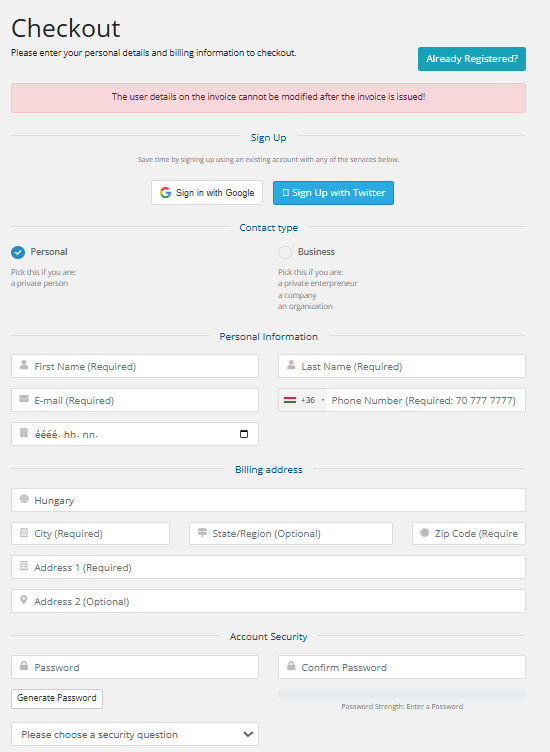
4. You can then enter contact details for the domain name (owner, administrative or technical contact). For each order, you can use previously-entered contacts, but you also have the option to enter a new contact for each domain name.
**As a private individual, you must provide your date of birth! (in the yyyy.mm.dd. format)**
[](https://dotroll.com/en/knowledge-base/uploads/images/gallery/2025-03/pJzimage.png)
[](https://dotroll.com/en/knowledge-base/uploads/images/gallery/2025-03/az3image.png)
5.
It is essential that (if your email address and phone number have not been verified in the past year) for a .hu domain registration, it is mandatory to confirm your email address and phone number. Please provide a valid and actively used contact! **Without verification, the domain registration will not proceed!**
6. Select whether you want a single-factor or two-factor domain registration, then read and accept the checkboxes! If you do not fill in the **"e-mail address for confirmation"** field, it will default to the applicant's email address.
[](https://dotroll.com/en/knowledge-base/uploads/images/gallery/2025-03/7Ntimage.png)
Future modifications must be confirmed using a factor rather than document-based verification. The first factor is always the email address, and in the case of two-factor authentication, the second factor is always the phone number.
7. At the bottom of the page, you must choose a payment method that may be one of the following:
- CreditCard via PayPal
- BankTransfer
- Credit card payment
- PayPal
Next, check the box to **I have read and agree to the Terms of Service** and then click the **Complete Order →** button.
8. On the next page, enter the captcha code for the .hu domain name entry, and then click **I agree** button.
9. After that, the system will automatically be redirected to the payment interface.
10. After the payment completed, your order will be forwarded, and started to the Council of Hungarian Internet Providers (CHIP). ***If verification is required, please check your inbox, as the confirmation email will be sent immediately after placing the order!***
11. Once the domain name has been successfully registered, our system will send you an email notification to the email address provided at the account payer.
If you choose this method, the service provider may become a server and the site will not work!
If the service provider fails to fits with the technical check, you can set a record A for the service provider. The required IP address in cPanel is probably located in the **Server Information** at the bottom of the **General Information** box at the right.
#### SUBDOMAIN NAME SERVER SWITCHING
If nothing else helps you, you can choose a subdomain (eg blog.domainname.hu) that allows you to register your storage. To do this, two NS records must be added to the administrative interface. (Please note that there is no name server change but two new NS entries!) This looks pretty much like this:
blog.domainname.hu. IN NS ns2333.hostgator.com.
blog.domainname.hu. IN NS ns2334.hostgator.com.
The actual NS records must be read from cPanel! These are also most likely to be found at in the **Server Information** at the bottom of the **General Information** box at the right.
# How to Transfer a .hu Domain Name
Registrar transfer (or registrar transfer combined with domain user change in a single step) is possible for domains with two-factor authentication as well as for older, document-based domain names.
Only in the case of an ownership change **can the transfer be performed. The domain must first be "factorised" (enabled for two-factor authentication) at the current registrar.**
1.To initiate a domain transfer, click this **[link](https://admin.dotroll.com/cart.php?a=add&domain=transfer&language=english)**. Then provide the corresponding **AUTH code in the authorization code field.** This code must be requested from the current registrar, and the .hu registry will send it to the domain user's email address. The AUTH code can only be requested for a factor-based domain name. ***If the domain name is not yet protected with two-factor authentication, the AUTH code is not required. Please leave the field empty!***
After a Registrar and/or domain holder change, no further transfers (Registrar or holder change) can be requested for 30 days.
# How to Change the Administrative Contact for a .hu Domain
**.hu administrative contact change** will only be possible if the domain name is already **using factor-based authentication.** If the domain name is still document-based and you want to change the administrative the domain must first be converted to factor authentication. **Only the current Registrar can perform this modification; the new registrar cannot.**
#### REPLACE THE CURRENT ADMIN CONTACT OF THE DOMAIN NAME
1. Sign in with [https://admin.dotroll.com](https://admin.dotroll.com/?swcfpc=1) with your username and password
2. In the top menu bar, click the **Domains** / **My Domains** menu.
3. Select the domain name for which you want to make the change and then click on it.
4. In the **Manage** box on the left, select **Contacts change**.
5. At the top of the page that appears, you can see the current domain admin contact and its data.
6. To find a change to the **Admin contact** item, select from the drop down list below:
- formerly created the contact
- or select the **Add New Contact…** option to add a new contact
7. Choose the admin contact type that can be:
- Person
- Company
8. Then fill out the form elements.
9. Click the **Next** button where the system will show an overview page with the data you entered.
10. If all data is correct, click **Checkout** button of the bottom of the page.
11. We submit the order to the central registry, and the .hu registry will send the necessary emails for validation and confirmation. Please follow the instructions in the emails, and once all confirmations are completed, the .hu registry analyst will approve the ownership change. **Please check your email inbox regularly!**
12. You can return to the online interface at the bottom of the page by clicking the **« Back to the Client Area** link.